Free Chrome extension
See what your PTE Core score really says
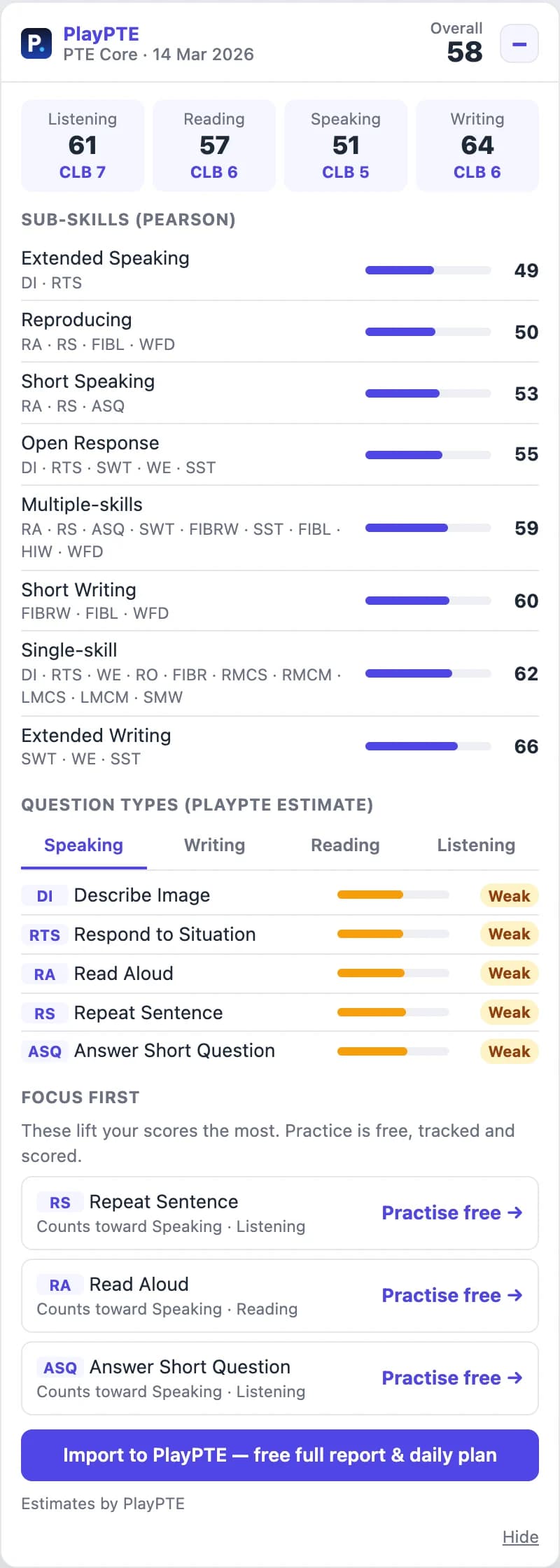
PlayPTE Score Import adds a panel to your score page on myPTE: the CLB level of each skill, all 8 Pearson sub-skills, which question types are weak, and what to practise first.
- Free for everyone
- PTE Core
- Reads only your scores
Coming soon to the Chrome Web Store
How it works
- 1
Install the extension
Add PlayPTE Score Import to Chrome. You don’t need an account to see the panel.
- 2
Open your score on myPTE
Sign in at mypte.pearsonpte.com as usual and open your PTE Core score report. The panel appears on the page.
- 3
Import to PlayPTE (optional)
One click opens your full report on PlayPTE. Save it to your free account and your daily plans start with what to fix first.
What you get
On your score page
- Your 4 skill scores with the CLB level each one reaches
- All 8 Pearson sub-skills, weakest first, with the question types behind each
- Every question type marked weak, fair or strong
- Your top 3 to focus on, each with a free practice link
On PlayPTE, after you import
- A full report against your CLB target
- Daily plans that start with your weakest question types
- All your imported results in one place
Your privacy
- It runs only on mypte.pearsonpte.com.
- It reads your scores, test type and test date — never your name, candidate ID, password or cookies.
- Nothing is sent until you click “Import to PlayPTE”.
- The extension has no analytics or tracking.
Questions
Is it free?
Yes. The extension, the panel, the report and the daily plans are free for everyone.
Does it work for PTE Academic?
Not yet. It supports PTE Core results today. Academic support is coming.
Which browsers does it work in?
Google Chrome on a computer (Windows, Mac, Linux or ChromeOS). Chrome on phones does not support extensions.
Are the question-type results official?
No. Pearson reports skills and sub-skills only. The question-type strengths and the focus list are PlayPTE estimates worked out from those official scores.
Do I need a PlayPTE account?
Not to see the panel. You need a free account only to save your result and get daily plans.
How do I delete an imported result?
Open the result on PlayPTE and click “Delete this result”. You can also uninstall the extension at any time.
Got your PTE Core score?
Open it on myPTE with the extension installed and see what to practise first. Practice on PlayPTE is free, tracked and scored.
Coming soon to the Chrome Web Store
Start practising free